Hi Chris,
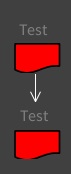
I attached a screenshot of the desired result. It seems to me the problem is not where the arrow is connected, but the Tree Layout, which is positioning the "Test" label as if it would be the root of a tree with the svg figures as their leaves. I still don't get how to apply a vertical layout (not tree) to a RTCompositeShape, assuming that could be a reasonable solution. Cheers,
Hernán
2018-08-28 18:25 GMT-03:00 Chris Cunningham cunningham.cb@gmail.com:
Hi, I looks like the arrow is still centered on the shapes; it is just that the 'shapes' are now composite shapes consisting of the text 'Test' and the drawn/filled shape.
What I think you want is a way to connect the arrows between the SVG sub-shapes, correct? I am not sure (at all) how to do that.
-cbc
On Tue, Aug 28, 2018 at 12:04 PM Hernán Morales Durand hernan.morales@gmail.com wrote:
Attached screenshots just in case someone has a clue. Cheers,
Hernán
2018-08-23 14:31 GMT-03:00 Hernán Morales Durand hernan.morales@gmail.com:
Hi,
When connecting two composite shapes with RTEdgeBuilder, the connector position loose its center over the connecting shapes.
It's easier to explain with two scripts:
This one looks good, the connector (RTArrowedLine) is centered:
| view shapes myElems | view := RTView new. myElems := 1 to: 2. shapes := (RTSVGPath new path: 'm 3.96875,9.2604167 h 31.75 V 25.135417 C 22.489583,23.8125 17.197917,34.395833 3.96875,27.78125 Z'; fillColor: Color red; borderColor: Color black; borderWidth: 1.2; scale: 1.4) elementsOn: myElems. view addAll: shapes. RTEdgeBuilder new view: view; shape: (RTArrowedLine new color: Color white; yourself); elements: shapes; connectFrom: 1 to: 2. RTTreeLayout new verticalGap: 30; horizontalGap: 30; applyOn: shapes. view inspect.
However when adding a label in a composite, both label and arrow looks shifted:
| view shape shapes myElems | view := RTView new. myElems := 1 to: 2. shape := RTCompositeShape new add: (RTLabel new text: 'Test'); add: (RTSVGPath new path: 'm 3.96875,9.2604167 h 31.75 V 25.135417 C 22.489583,23.8125 17.197917,34.395833 3.96875,27.78125 Z'; fillColor: Color red; borderColor: Color black; borderWidth: 1.2; scale: 1.4); vertical; yourself. shapes := shape elementsOn: myElems. view addAll: shapes. RTEdgeBuilder new view: view; shape: (RTArrowedLine new color: Color white; yourself); elements: shapes; connectFrom: 1 to: 2. RTTreeLayout new verticalGap: 30; horizontalGap: 30; applyOn: shapes. view inspect.
Any idea how to align these shapes?
Cheers,
Hernán
Moose-dev mailing list Moose-dev@list.inf.unibe.ch https://www.list.inf.unibe.ch/listinfo/moose-dev
Moose-dev mailing list Moose-dev@list.inf.unibe.ch https://www.list.inf.unibe.ch/listinfo/moose-dev